Yep, we may get a tiny thank-you (read: commission) when you buy through
links on Gadgetspotr — not enough for a yacht, but enough to keep the lights (and
servers) on.
Learn more
What makes the Sculpfun iCube Ultra special? We looked at 150 specs & features in this laser engraver & cutter — including community-favorites like general information, laser module, performance & capabilities & work area.
A fast snapshot of the Sculpfun iCube Ultra, covering its standout specification and what you can expect right out of the box.
Sculpfun iCube Ultra
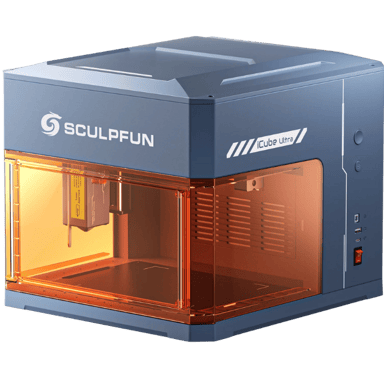
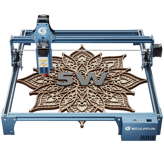
The Sculpfun iCube Ultra is a compact, fully enclosed 10W laser engraver designed specifically for safe and clean indoor use. Its built-in smoke filtration system and protective shield eliminate the need for bulky ventilation or safety goggles, making it perfect for home offices and classrooms. This portable powerhouse combines high-speed performance with industrial-grade precision, allowing you to personalize wood, leather, and metal items with incredible ease and professional quality.
Specifications & Facts
150
Specs measured. Drama avoided.
Specs, performance, and value — we unpacked the Sculpfun iCube Ultra laser engraver & cutter across every angle. See how it stacks up against other laser engravers & cutters.
General Information
9
Sculpfun iCube Ultra
Machine Width
What is the machine width?
23.23
inch
0Votes
Laser Engraver & Cutter in this range
Who knows?
(Help us out by suggesting one!)
Sculpfun iCube Ultra
The overall width of the machine is 23.23 inch (59.00 cm). This dimension is important for fitting the engraver into your workspace.
Width of the machine footprint.
Don’t keep it to yourself — be the first to react and review the
Machine Width on Sculpfun iCube Ultra
◉ and help others decide!
Laser Engraver & Cutter in this range
Who knows?
(Help us out by suggesting one!)
Defines the category of the machine.
Don’t keep it to yourself — be the first to react and review the
Product Type on Sculpfun iCube Ultra
◉ and help others decide!
Sculpfun iCube Ultra
Frame Type
What is the frame type?
0
Sculpfun iCube Ultra
0
Votes
Enclosed
Laser Engraver & Cutter in this range
Who knows?
(Help us out by suggesting one!)
Describes structural design of the machine.
Don’t keep it to yourself — be the first to react and review the
Frame Type on Sculpfun iCube Ultra
◉ and help others decide!
Sculpfun iCube Ultra
Intended Use Cases
What are the intended use cases?
0
Sculpfun iCube Ultra
0
Votes
Hobby, Professional
Laser Engraver & Cutter in this range
Who knows?
(Help us out by suggesting one!)
Describes user applications.
Don’t keep it to yourself — be the first to react and review the
Intended Use Cases on Sculpfun iCube Ultra
◉ and help others decide!
Sculpfun iCube Ultra
Supported Operating Systems
Which operating systems are supported?
0
Sculpfun iCube Ultra
0
Votes
Windows, macOS, Linux
Laser Engraver & Cutter in this range
Who knows?
(Help us out by suggesting one!)
Indicates OS compatibility for controlling software.
Don’t keep it to yourself — be the first to react and review the
Supported Operating Systems on Sculpfun iCube Ultra
◉ and help others decide!
Sculpfun iCube Ultra
Control Method
What is the control method?
0
Sculpfun iCube Ultra
0
Votes
Software, Mobile App, Offline
Laser Engraver & Cutter in this range
Who knows?
(Help us out by suggesting one!)
Defines how the user operates the machine.
Don’t keep it to yourself — be the first to react and review the
Control Method on Sculpfun iCube Ultra
◉ and help others decide!
Sculpfun iCube Ultra
Machine Weight
What is the machine weight?
16.76
lbs
0Votes
Laser Engraver & Cutter in this range
Who knows?
(Help us out by suggesting one!)
Total weight of the machine.
Don’t keep it to yourself — be the first to react and review the
Machine Weight on Sculpfun iCube Ultra
◉ and help others decide!
Sculpfun iCube Ultra
Machine Depth
What is the machine depth?
15.16
inch
0Votes
Laser Engraver & Cutter in this range
Who knows?
(Help us out by suggesting one!)
Depth of the machine footprint.
Don’t keep it to yourself — be the first to react and review the
Machine Depth on Sculpfun iCube Ultra
◉ and help others decide!
Sculpfun iCube Ultra
Machine Height
What is the machine height?
5.91
inch
0Votes
Laser Engraver & Cutter in this range
Who knows?
(Help us out by suggesting one!)
Total height of the machine.
Don’t keep it to yourself — be the first to react and review the
Machine Height on Sculpfun iCube Ultra
◉ and help others decide!
Laser Module
13
Sculpfun iCube Ultra
Laser Power Optical
What is the optical laser power?
20
Watt
0Votes
Laser Engraver & Cutter in this range
Who knows?
(Help us out by suggesting one!)
Sculpfun iCube Ultra
The optical power of the laser is 20 Watt. This is the actual output power of the laser beam, directly impacting cutting and engraving capability.
The actual cutting/engraving power delivered to materials.
Don’t keep it to yourself — be the first to react and review the
Laser Power Optical on Sculpfun iCube Ultra
◉ and help others decide!
Sculpfun iCube Ultra
Laser Focal Length
What is the focal length?
1.6
inch
0Votes
Laser Engraver & Cutter in this range
Who knows?
(Help us out by suggesting one!)
Sculpfun iCube Ultra
The laser focal length is 1.6 inch (4.06 cm). This is the optimal distance between the laser lens and the material for the sharpest beam and most effective engraving/cutting.
Distance from lens to optimal focus point.
Don’t keep it to yourself — be the first to react and review the
Laser Focal Length on Sculpfun iCube Ultra
◉ and help others decide!
Sculpfun iCube Ultra
Laser Lifespan
What is the laser lifespan?
10,000
hours
0Votes
Laser Engraver & Cutter in this range
Who knows?
(Help us out by suggesting one!)
Sculpfun iCube Ultra
The expected lifespan of the laser module is approximately 10000 hours. This indicates the long-term durability and operational longevity of the laser.
Expected operational hours before degradation.
Don’t keep it to yourself — be the first to react and review the
Laser Lifespan on Sculpfun iCube Ultra
◉ and help others decide!
Sculpfun iCube Ultra
Laser Type
What is the laser type?
0
Sculpfun iCube Ultra
0
Votes
Diode
Laser Engraver & Cutter in this range
Who knows?
(Help us out by suggesting one!)
Indicates the type of laser module used.
Don’t keep it to yourself — be the first to react and review the
Laser Type on Sculpfun iCube Ultra
◉ and help others decide!
Sculpfun iCube Ultra
Laser Classification
What is the laser classification?
0
Sculpfun iCube Ultra
0
Votes
Class 1
Laser Engraver & Cutter in this range
Who knows?
(Help us out by suggesting one!)
Indicates safety classification based on laser standards.
Don’t keep it to yourself — be the first to react and review the
Laser Classification on Sculpfun iCube Ultra
◉ and help others decide!
Sculpfun iCube Ultra
Laser Wavelength
What is the laser wavelength?
455
nm
0Votes
Laser Engraver & Cutter in this range
Who knows?
(Help us out by suggesting one!)
Defines the wavelength of the emitted laser light.
Don’t keep it to yourself — be the first to react and review the
Laser Wavelength on Sculpfun iCube Ultra
◉ and help others decide!
Sculpfun iCube Ultra
Laser Cooling Method
What is the cooling method?
0
Sculpfun iCube Ultra
0
Votes
Air Cooling
Laser Engraver & Cutter in this range
Who knows?
(Help us out by suggesting one!)
Defines how the laser dissipates heat.
Don’t keep it to yourself — be the first to react and review the
Laser Cooling Method on Sculpfun iCube Ultra
◉ and help others decide!
Sculpfun iCube Ultra
Laser Power Electrical Input
What is the electrical input power?
120
Watt
0Votes
Laser Engraver & Cutter in this range
Who knows?
(Help us out by suggesting one!)
Electrical input power needed to drive the laser.
Don’t keep it to yourself — be the first to react and review the
Laser Power Electrical Input on Sculpfun iCube Ultra
◉ and help others decide!
Sculpfun iCube Ultra
Laser Spot Size
What is the laser spot size?
0
Sculpfun iCube Ultra
0
Votes
0.08 x 0.1mm
Laser Engraver & Cutter in this range
Who knows?
(Help us out by suggesting one!)
Defines the diameter of the focused laser spot.
Don’t keep it to yourself — be the first to react and review the
Laser Spot Size on Sculpfun iCube Ultra
◉ and help others decide!
Sculpfun iCube Ultra
Adjustable Focus
Does it have adjustable focus?
Yes
0Votes
Sculpfun iCube Ultra
Laser Engraver & Cutter in this range
Who knows?
(Help us out by suggesting one!)
Allows manual adjustment of laser focusing height.
Don’t keep it to yourself — be the first to react and review the
Adjustable Focus on Sculpfun iCube Ultra
◉ and help others decide!
Sculpfun iCube Ultra
Beam Quality
What is the beam quality?
0
Sculpfun iCube Ultra
0
Votes
High
Laser Engraver & Cutter in this range
Who knows?
(Help us out by suggesting one!)
Describes the uniformity and stability of the beam.
Don’t keep it to yourself — be the first to react and review the
Beam Quality on Sculpfun iCube Ultra
◉ and help others decide!
Sculpfun iCube Ultra
Modulation Frequency
What is the modulation frequency?
20,000
Hz
0Votes
Laser Engraver & Cutter in this range
Who knows?
(Help us out by suggesting one!)
Defines how fast the laser can pulse for engraving detail.
Don’t keep it to yourself — be the first to react and review the
Modulation Frequency on Sculpfun iCube Ultra
◉ and help others decide!
Sculpfun iCube Ultra
Laser Replaceability
Is the laser replaceable?
Yes
0Votes
Sculpfun iCube Ultra
Laser Engraver & Cutter in this range
Who knows?
(Help us out by suggesting one!)
Indicates whether the laser module can be replaced.
Don’t keep it to yourself — be the first to react and review the
Laser Replaceability on Sculpfun iCube Ultra
◉ and help others decide!
Performance & Capabilities
14
Sculpfun iCube Ultra
Maximum Engraving Speed
What is the maximum engraving speed?
1,181.1
inch
0Votes
Laser Engraver & Cutter in this range
Who knows?
(Help us out by suggesting one!)
Sculpfun iCube Ultra
The maximum engraving speed is 1181.1 inch (3000.00 cm) per second. This high speed allows for rapid creation of detailed designs.
The fastest speed at which the machine can engrave.
Don’t keep it to yourself — be the first to react and review the
Maximum Engraving Speed on Sculpfun iCube Ultra
◉ and help others decide!
Sculpfun iCube Ultra
Maximum Cutting Depth Metal Assisted
What is the maximum assisted metal cutting depth?
0.02
inch
0Votes
Laser Engraver & Cutter in this range
Who knows?
(Help us out by suggesting one!)
Sculpfun iCube Ultra
With air assist, the maximum cutting depth for metal is 0.02 inch (0.05 cm). This enables light metal cutting for specialized projects.
Depth of metal cutting with external assistance (air/oxygen).
Don’t keep it to yourself — be the first to react and review the
Maximum Cutting Depth Metal Assisted on Sculpfun iCube Ultra
◉ and help others decide!
Sculpfun iCube Ultra
Repeatability
What is the repeatability value?
0
inch
0Votes
Laser Engraver & Cutter in this range
Who knows?
(Help us out by suggesting one!)
Sculpfun iCube Ultra
The repeatability of the machine is 0.002 inch (0.01 cm). This measures how accurately the laser can return to a previously marked position, ensuring consistent results across multiple jobs.
Consistency of repeated movements to the same location.
Don’t keep it to yourself — be the first to react and review the
Repeatability on Sculpfun iCube Ultra
◉ and help others decide!
Sculpfun iCube Ultra
Supported Resolution DPI
What is the supported DPI?
1,000
DPI
0Votes
Laser Engraver & Cutter in this range
Who knows?
(Help us out by suggesting one!)
Sculpfun iCube Ultra
The machine supports an engraving resolution of up to 1000 DPI. This allows for highly detailed and intricate designs.
Maximum engraving resolution measured in DPI.
Don’t keep it to yourself — be the first to react and review the
Supported Resolution DPI on Sculpfun iCube Ultra
◉ and help others decide!
Sculpfun iCube Ultra
Engraving Precision
What is the engraving precision?
0
inch
0Votes
Laser Engraver & Cutter in this range
Who knows?
(Help us out by suggesting one!)
Refers to the smallest detectable engraving detail.
Don’t keep it to yourself — be the first to react and review the
Engraving Precision on Sculpfun iCube Ultra
◉ and help others decide!
Sculpfun iCube Ultra
Maximum Cutting Speed
What is the maximum cutting speed?
196.8
inch
0Votes
Laser Engraver & Cutter in this range
Who knows?
(Help us out by suggesting one!)
The fastest speed at which the machine can cut materials.
Don’t keep it to yourself — be the first to react and review the
Maximum Cutting Speed on Sculpfun iCube Ultra
◉ and help others decide!
Sculpfun iCube Ultra
Maximum Cutting Depth Wood
What is the maximum cutting depth for wood?
0.59
inch
0Votes
Laser Engraver & Cutter in this range
Who knows?
(Help us out by suggesting one!)
Deepest wood thickness the laser can cut in one pass.
Don’t keep it to yourself — be the first to react and review the
Maximum Cutting Depth Wood on Sculpfun iCube Ultra
◉ and help others decide!
Sculpfun iCube Ultra
Maximum Cutting Depth Acrylic
What is the maximum acrylic cutting depth?
0.39
inch
0Votes
Laser Engraver & Cutter in this range
Who knows?
(Help us out by suggesting one!)
Deepest acrylic thickness the machine can cut.
Don’t keep it to yourself — be the first to react and review the
Maximum Cutting Depth Acrylic on Sculpfun iCube Ultra
◉ and help others decide!
Sculpfun iCube Ultra
Maximum Cutting Depth Leather
What is the maximum leather cutting depth?
0.2
inch
0Votes
Laser Engraver & Cutter in this range
Who knows?
(Help us out by suggesting one!)
Maximum depth of leather cutting ability.
Don’t keep it to yourself — be the first to react and review the
Maximum Cutting Depth Leather on Sculpfun iCube Ultra
◉ and help others decide!
Sculpfun iCube Ultra
Positioning Accuracy
What is the positioning accuracy?
0
inch
0Votes
Laser Engraver & Cutter in this range
Who knows?
(Help us out by suggesting one!)
Defines how close the system can position the laser head to exact coordinates.
Don’t keep it to yourself — be the first to react and review the
Positioning Accuracy on Sculpfun iCube Ultra
◉ and help others decide!
Sculpfun iCube Ultra
Supported Line Thickness
What is the supported line thickness?
0
inch
0Votes
Laser Engraver & Cutter in this range
Who knows?
(Help us out by suggesting one!)
Minimum and maximum thickness of engraved lines.
Don’t keep it to yourself — be the first to react and review the
Supported Line Thickness on Sculpfun iCube Ultra
◉ and help others decide!
Sculpfun iCube Ultra
Flame Detection
Does it have flame detection?
Yes
0Votes
Sculpfun iCube Ultra
Laser Engraver & Cutter in this range
Who knows?
(Help us out by suggesting one!)
System detects flame formation during cutting.
Don’t keep it to yourself — be the first to react and review the
Flame Detection on Sculpfun iCube Ultra
◉ and help others decide!
Sculpfun iCube Ultra
Tilt Detection
Does it include tilt detection?
Yes
0Votes
Sculpfun iCube Ultra
Laser Engraver & Cutter in this range
Who knows?
(Help us out by suggesting one!)
Detects tilting or instability to prevent accidents.
Don’t keep it to yourself — be the first to react and review the
Tilt Detection on Sculpfun iCube Ultra
◉ and help others decide!
Sculpfun iCube Ultra
Real Time Preview Capability
Does it have real-time preview?
Yes
0Votes
Sculpfun iCube Ultra
Laser Engraver & Cutter in this range
Who knows?
(Help us out by suggesting one!)
Provides live preview of engraving position.
Don’t keep it to yourself — be the first to react and review the
Real Time Preview Capability on Sculpfun iCube Ultra
◉ and help others decide!
Work Area
12
Sculpfun iCube Ultra
Work Style
What is the work style?
0
Sculpfun iCube Ultra
0
Votes
Enclosed
Laser Engraver & Cutter in this range
Who knows?
(Help us out by suggesting one!)
Sculpfun iCube Ultra
The machine features an Enclosed work style. An enclosed design provides safety and fume containment during operation.
Indicates whether the device operates in open air or inside a chamber.
Don’t keep it to yourself — be the first to react and review the
Work Style on Sculpfun iCube Ultra
◉ and help others decide!
Sculpfun iCube Ultra
Work Area Height Clearance
What is the height clearance?
4.72
inch
0Votes
Laser Engraver & Cutter in this range
Who knows?
(Help us out by suggesting one!)
Sculpfun iCube Ultra
The work area height clearance is 4.72 inch (12.00 cm). This specifies the maximum thickness of material that can be placed under the laser head.
Maximum allowable material height under the laser.
Don’t keep it to yourself — be the first to react and review the
Work Area Height Clearance on Sculpfun iCube Ultra
◉ and help others decide!
Sculpfun iCube Ultra
Bed Leveling Method
What is the bed leveling method?
0
Sculpfun iCube Ultra
0
Votes
Manual
Laser Engraver & Cutter in this range
Who knows?
(Help us out by suggesting one!)
Sculpfun iCube Ultra
The bed leveling method is Manual. This means users must adjust the work surface height manually to achieve optimal focus.
Shows how the work bed is leveled for consistency.
Don’t keep it to yourself — be the first to react and review the
Bed Leveling Method on Sculpfun iCube Ultra
◉ and help others decide!
Sculpfun iCube Ultra
Work Area Width
What is the work area width?
14.57
inch
0Votes
Laser Engraver & Cutter in this range
Who knows?
(Help us out by suggesting one!)
The usable horizontal workspace width.
Don’t keep it to yourself — be the first to react and review the
Work Area Width on Sculpfun iCube Ultra
◉ and help others decide!
Sculpfun iCube Ultra
Work Area Depth
What is the work area depth?
8.27
inch
0Votes
Laser Engraver & Cutter in this range
Who knows?
(Help us out by suggesting one!)
The usable horizontal workspace depth.
Don’t keep it to yourself — be the first to react and review the
Work Area Depth on Sculpfun iCube Ultra
◉ and help others decide!
Sculpfun iCube Ultra
Max Material Height Without Riser
What is the max material height without riser?
4.72
inch
0Votes
Laser Engraver & Cutter in this range
Who knows?
(Help us out by suggesting one!)
Maximum object height supported on the base level.
Don’t keep it to yourself — be the first to react and review the
Max Material Height Without Riser on Sculpfun iCube Ultra
◉ and help others decide!
Sculpfun iCube Ultra
Max Material Height With Riser
What is the max material height with riser?
4.72
inch
0Votes
Laser Engraver & Cutter in this range
Who knows?
(Help us out by suggesting one!)
Maximum material height supported when a riser is installed.
Don’t keep it to yourself — be the first to react and review the
Max Material Height With Riser on Sculpfun iCube Ultra
◉ and help others decide!
Sculpfun iCube Ultra
Honeycomb Bed
Is a honeycomb bed included?
Yes
0Votes
Sculpfun iCube Ultra
Laser Engraver & Cutter in this range
Who knows?
(Help us out by suggesting one!)
Indicates whether a honeycomb bed is included for airflow and cut quality.
Don’t keep it to yourself — be the first to react and review the
Honeycomb Bed on Sculpfun iCube Ultra
◉ and help others decide!
Sculpfun iCube Ultra
Work Surface Type
What is the work surface type?
0
Sculpfun iCube Ultra
0
Votes
Honeycomb
Laser Engraver & Cutter in this range
Who knows?
(Help us out by suggesting one!)
Describes the type of workspace material sits on.
Don’t keep it to yourself — be the first to react and review the
Work Surface Type on Sculpfun iCube Ultra
◉ and help others decide!
Sculpfun iCube Ultra
Clamping Hold Down System
What clamping system is used?
0
Sculpfun iCube Ultra
0
Votes
Magnetic Clamps
Laser Engraver & Cutter in this range
Who knows?
(Help us out by suggesting one!)
Method used to secure materials during cutting.
Don’t keep it to yourself — be the first to react and review the
Clamping Hold Down System on Sculpfun iCube Ultra
◉ and help others decide!
Sculpfun iCube Ultra
Grid Marking Reference
Does it have grid markings?
Yes
0Votes
Sculpfun iCube Ultra
Laser Engraver & Cutter in this range
Who knows?
(Help us out by suggesting one!)
Indicates whether the workspace has grid lines for alignment.
Don’t keep it to yourself — be the first to react and review the
Grid Marking Reference on Sculpfun iCube Ultra
◉ and help others decide!
Sculpfun iCube Ultra
Material Pass Through Size
What is the material pass-through size?
0
inch
0Votes
Laser Engraver & Cutter in this range
Who knows?
(Help us out by suggesting one!)
Maximum thickness of material that can pass through if supported.
Don’t keep it to yourself — be the first to react and review the
Material Pass Through Size on Sculpfun iCube Ultra
◉ and help others decide!
Material Compatibility
15
Sculpfun iCube Ultra
Acrylic Engraving
Can it engrave acrylic?
Yes
0Votes
Sculpfun iCube Ultra
Laser Engraver & Cutter in this range
Who knows?
(Help us out by suggesting one!)
Sculpfun iCube Ultra
Acrylic materials can be readily engraved with this laser, suitable for creating detailed signs, displays, and custom acrylic products.
Ability to engrave acrylic surfaces.
Don’t keep it to yourself — be the first to react and review the
Acrylic Engraving on Sculpfun iCube Ultra
◉ and help others decide!
Sculpfun iCube Ultra
Acrylic Cutting
Can it cut acrylic?
Yes
0Votes
Sculpfun iCube Ultra
Laser Engraver & Cutter in this range
Who knows?
(Help us out by suggesting one!)
Sculpfun iCube Ultra
Acrylic cutting is a supported function, enabling clean and precise cuts on acrylic sheets for various projects.
Ability to cut acrylic sheets.
Don’t keep it to yourself — be the first to react and review the
Acrylic Cutting on Sculpfun iCube Ultra
◉ and help others decide!
Sculpfun iCube Ultra
Wood Cutting Capability
Can it cut wood?
Yes
0Votes
Sculpfun iCube Ultra
Laser Engraver & Cutter in this range
Who knows?
(Help us out by suggesting one!)
Ability to cut through wood materials.
Don’t keep it to yourself — be the first to react and review the
Wood Cutting Capability on Sculpfun iCube Ultra
◉ and help others decide!
Sculpfun iCube Ultra
Leather Engraving
Can it engrave leather?
Yes
0Votes
Sculpfun iCube Ultra
Laser Engraver & Cutter in this range
Who knows?
(Help us out by suggesting one!)
Ability to engrave leather materials.
Don’t keep it to yourself — be the first to react and review the
Leather Engraving on Sculpfun iCube Ultra
◉ and help others decide!
Sculpfun iCube Ultra
Leather Cutting
Can it cut leather?
Yes
0Votes
Sculpfun iCube Ultra
Laser Engraver & Cutter in this range
Who knows?
(Help us out by suggesting one!)
Ability to cut leather materials.
Don’t keep it to yourself — be the first to react and review the
Leather Cutting on Sculpfun iCube Ultra
◉ and help others decide!
Sculpfun iCube Ultra
Fabric Engraving
Can it engrave fabric?
Yes
0Votes
Sculpfun iCube Ultra
Laser Engraver & Cutter in this range
Who knows?
(Help us out by suggesting one!)
Ability to engrave textiles.
Don’t keep it to yourself — be the first to react and review the
Fabric Engraving on Sculpfun iCube Ultra
◉ and help others decide!
Sculpfun iCube Ultra
Fabric Cutting
Can it cut fabric?
Yes
0Votes
Sculpfun iCube Ultra
Laser Engraver & Cutter in this range
Who knows?
(Help us out by suggesting one!)
Ability to cut textile materials.
Don’t keep it to yourself — be the first to react and review the
Fabric Cutting on Sculpfun iCube Ultra
◉ and help others decide!
Sculpfun iCube Ultra
Metal Engraving Coated Anodized
Can it engrave coated or anodized metal?
Yes
0Votes
Sculpfun iCube Ultra
Laser Engraver & Cutter in this range
Who knows?
(Help us out by suggesting one!)
Ability to engrave coated or anodized metals.
Don’t keep it to yourself — be the first to react and review the
Metal Engraving Coated Anodized on Sculpfun iCube Ultra
◉ and help others decide!
Sculpfun iCube Ultra
Wood Engraving Capability
Can it engrave wood?
Yes
0Votes
Sculpfun iCube Ultra
Laser Engraver & Cutter in this range
Who knows?
(Help us out by suggesting one!)
Ability to engrave various types of wood.
Don’t keep it to yourself — be the first to react and review the
Wood Engraving Capability on Sculpfun iCube Ultra
◉ and help others decide!
Sculpfun iCube Ultra
Rubber Engraving
Can it engrave rubber?
Yes
0Votes
Sculpfun iCube Ultra
Laser Engraver & Cutter in this range
Who knows?
(Help us out by suggesting one!)
Ability to engrave rubber materials.
Don’t keep it to yourself — be the first to react and review the
Rubber Engraving on Sculpfun iCube Ultra
◉ and help others decide!
Sculpfun iCube Ultra
Metal Cutting Assisted
Can it cut metal with assistance?
Yes
0Votes
Sculpfun iCube Ultra
Laser Engraver & Cutter in this range
Who knows?
(Help us out by suggesting one!)
Ability to cut metal using assisted methods (air/oxygen).
Don’t keep it to yourself — be the first to react and review the
Metal Cutting Assisted on Sculpfun iCube Ultra
◉ and help others decide!
Sculpfun iCube Ultra
Glass Engraving
Can it engrave glass?
Yes
0Votes
Sculpfun iCube Ultra
Laser Engraver & Cutter in this range
Who knows?
(Help us out by suggesting one!)
Ability to engrave glass surfaces.
Don’t keep it to yourself — be the first to react and review the
Glass Engraving on Sculpfun iCube Ultra
◉ and help others decide!
Sculpfun iCube Ultra
Stone Engraving
Can it engrave stone?
Yes
0Votes
Sculpfun iCube Ultra
Laser Engraver & Cutter in this range
Who knows?
(Help us out by suggesting one!)
Ability to engrave stone surfaces.
Don’t keep it to yourself — be the first to react and review the
Stone Engraving on Sculpfun iCube Ultra
◉ and help others decide!
Sculpfun iCube Ultra
Ceramic Engraving
Can it engrave ceramic?
Yes
0Votes
Sculpfun iCube Ultra
Laser Engraver & Cutter in this range
Who knows?
(Help us out by suggesting one!)
Ability to engrave ceramic materials.
Don’t keep it to yourself — be the first to react and review the
Ceramic Engraving on Sculpfun iCube Ultra
◉ and help others decide!
Sculpfun iCube Ultra
Material Thickness Limit
What is the maximum material thickness limit?
4.72
inch
0Votes
Laser Engraver & Cutter in this range
Who knows?
(Help us out by suggesting one!)
Maximum thickness of material the machine can handle.
Don’t keep it to yourself — be the first to react and review the
Material Thickness Limit on Sculpfun iCube Ultra
◉ and help others decide!
Laser Engraver & Cutter in this range
Who knows?
(Help us out by suggesting one!)
Sculpfun iCube Ultra
The machine supports file formats such as SVG,PNG,JPG,BMP,DXF,PDF. This wide compatibility allows for flexible design import from various software.
Types of files the machine can import.
Don’t keep it to yourself — be the first to react and review the
File Format Compatibility on Sculpfun iCube Ultra
◉ and help others decide!
Sculpfun iCube Ultra
USB Connectivity
Does it have USB connectivity?
Yes
0Votes
Sculpfun iCube Ultra
Laser Engraver & Cutter in this range
Who knows?
(Help us out by suggesting one!)
Sculpfun iCube Ultra
The engraver supports USB connectivity, allowing for direct data transfer and control via a USB cable, offering a reliable connection method.
Indicates support for USB cable or flash drive.
Don’t keep it to yourself — be the first to react and review the
USB Connectivity on Sculpfun iCube Ultra
◉ and help others decide!
Sculpfun iCube Ultra
Wi Fi Connectivity
Does it have Wi-Fi connectivity?
Yes
0Votes
Sculpfun iCube Ultra
Laser Engraver & Cutter in this range
Who knows?
(Help us out by suggesting one!)
Sculpfun iCube Ultra
For wireless convenience, the engraver features Wi-Fi connectivity, allowing for remote job submission and monitoring.
Ability to connect wirelessly via Wi-Fi.
Don’t keep it to yourself — be the first to react and review the
Wi Fi Connectivity on Sculpfun iCube Ultra
◉ and help others decide!
Sculpfun iCube Ultra
Camera Resolution
What is the camera resolution?
2
MP
0Votes
Laser Engraver & Cutter in this range
Who knows?
(Help us out by suggesting one!)
Sculpfun iCube Ultra
The integrated camera offers a resolution of 2 MP. A higher resolution camera provides a clearer live preview and more accurate material alignment.
Resolution of the built-in camera.
Don’t keep it to yourself — be the first to react and review the
Camera Resolution on Sculpfun iCube Ultra
◉ and help others decide!
Sculpfun iCube Ultra
Third Party Software Support
Does it support third-party software?
Yes
0Votes
Sculpfun iCube Ultra
Laser Engraver & Cutter in this range
Who knows?
(Help us out by suggesting one!)
Ability to use external programs like LightBurn or LaserGRBL.
Don’t keep it to yourself — be the first to react and review the
Third Party Software Support on Sculpfun iCube Ultra
◉ and help others decide!
Sculpfun iCube Ultra
Mobile App Support
Does it support a mobile app?
Yes
0Votes
Sculpfun iCube Ultra
Laser Engraver & Cutter in this range
Who knows?
(Help us out by suggesting one!)
Indicates whether a mobile application can control the machine.
Don’t keep it to yourself — be the first to react and review the
Mobile App Support on Sculpfun iCube Ultra
◉ and help others decide!
Sculpfun iCube Ultra
Camera Alignment System
Does it have a camera alignment system?
Yes
0Votes
Sculpfun iCube Ultra
Laser Engraver & Cutter in this range
Who knows?
(Help us out by suggesting one!)
Indicates whether a camera helps with job positioning.
Don’t keep it to yourself — be the first to react and review the
Camera Alignment System on Sculpfun iCube Ultra
◉ and help others decide!
Sculpfun iCube Ultra
Proprietary Software Support
Does it support proprietary software?
Yes
0Votes
Sculpfun iCube Ultra
Laser Engraver & Cutter in this range
Who knows?
(Help us out by suggesting one!)
Indicates support for the manufacturer’s official software.
Don’t keep it to yourself — be the first to react and review the
Proprietary Software Support on Sculpfun iCube Ultra
◉ and help others decide!
Sculpfun iCube Ultra
Offline Operation
Can it operate offline?
Yes
0Votes
Sculpfun iCube Ultra
Laser Engraver & Cutter in this range
Who knows?
(Help us out by suggesting one!)
Ability to run jobs without a computer or network.
Don’t keep it to yourself — be the first to react and review the
Offline Operation on Sculpfun iCube Ultra
◉ and help others decide!
Sculpfun iCube Ultra
Camera Preview Type
What is the camera preview type?
0
Sculpfun iCube Ultra
0
Votes
Live Preview
Laser Engraver & Cutter in this range
Who knows?
(Help us out by suggesting one!)
Type of visual preview available via camera.
Don’t keep it to yourself — be the first to react and review the
Camera Preview Type on Sculpfun iCube Ultra
◉ and help others decide!
Sculpfun iCube Ultra
Job Queue Management
Does it support job queue management?
Yes
0Votes
Sculpfun iCube Ultra
Laser Engraver & Cutter in this range
Who knows?
(Help us out by suggesting one!)
Ability to line up multiple jobs for continuous operation.
Don’t keep it to yourself — be the first to react and review the
Job Queue Management on Sculpfun iCube Ultra
◉ and help others decide!
Sculpfun iCube Ultra
Firmware Update Method
What is the firmware update method?
0
Sculpfun iCube Ultra
0
Votes
USB
Laser Engraver & Cutter in this range
Who knows?
(Help us out by suggesting one!)
How the device receives firmware updates.
Don’t keep it to yourself — be the first to react and review the
Firmware Update Method on Sculpfun iCube Ultra
◉ and help others decide!
Safety & Protection Features
14
Sculpfun iCube Ultra
Emergency Stop Button
Does it have an emergency stop button?
Yes
0Votes
Sculpfun iCube Ultra
Laser Engraver & Cutter in this range
Who knows?
(Help us out by suggesting one!)
Sculpfun iCube Ultra
An emergency stop button is present, providing an immediate shutdown of the machine in case of a malfunction or safety concern.
Allows immediate shutdown of the laser in emergencies.
Don’t keep it to yourself — be the first to react and review the
Emergency Stop Button on Sculpfun iCube Ultra
◉ and help others decide!
Sculpfun iCube Ultra
Auto Pause on Movement
Does it auto-pause when moved?
Yes
0Votes
Sculpfun iCube Ultra
Laser Engraver & Cutter in this range
Who knows?
(Help us out by suggesting one!)
Sculpfun iCube Ultra
The machine includes an auto pause on movement safety feature, which temporarily stops the laser if unintended movement is detected, preventing errors and ensuring safety.
Pauses job if machine is bumped or moved.
Don’t keep it to yourself — be the first to react and review the
Auto Pause on Movement on Sculpfun iCube Ultra
◉ and help others decide!
Sculpfun iCube Ultra
Error Alert Notifications
Does it provide error alerts?
Yes
0Votes
Sculpfun iCube Ultra
Laser Engraver & Cutter in this range
Who knows?
(Help us out by suggesting one!)
Sculpfun iCube Ultra
The machine provides error alert notifications, informing users of issues or malfunctions to facilitate quick troubleshooting and minimize downtime.
Provides alerts for malfunctions or unsafe conditions.
Don’t keep it to yourself — be the first to react and review the
Error Alert Notifications on Sculpfun iCube Ultra
◉ and help others decide!
Sculpfun iCube Ultra
Enclosure Protection
Does it have enclosure protection?
Yes
0Votes
Sculpfun iCube Ultra
Laser Engraver & Cutter in this range
Who knows?
(Help us out by suggesting one!)
Prevents laser exposure via enclosed housing.
Don’t keep it to yourself — be the first to react and review the
Enclosure Protection on Sculpfun iCube Ultra
◉ and help others decide!
Sculpfun iCube Ultra
Safety Sensors
Does it include safety sensors?
Yes
0Votes
Sculpfun iCube Ultra
Laser Engraver & Cutter in this range
Who knows?
(Help us out by suggesting one!)
Detects unsafe conditions during operation.
Don’t keep it to yourself — be the first to react and review the
Safety Sensors on Sculpfun iCube Ultra
◉ and help others decide!
Sculpfun iCube Ultra
Overheat Protection
Does it have overheat protection?
Yes
0Votes
Sculpfun iCube Ultra
Laser Engraver & Cutter in this range
Who knows?
(Help us out by suggesting one!)
Automatically stops operation if internal temperature is too high.
Don’t keep it to yourself — be the first to react and review the
Overheat Protection on Sculpfun iCube Ultra
◉ and help others decide!
Sculpfun iCube Ultra
Eye Protection Shield
Does it have an eye protection shield?
Yes
0Votes
Sculpfun iCube Ultra
Laser Engraver & Cutter in this range
Who knows?
(Help us out by suggesting one!)
Built-in shield reduces exposure to laser light.
Don’t keep it to yourself — be the first to react and review the
Eye Protection Shield on Sculpfun iCube Ultra
◉ and help others decide!
Laser Engraver & Cutter in this range
Who knows?
(Help us out by suggesting one!)
Certifications indicating regulatory compliance.
Don’t keep it to yourself — be the first to react and review the
Safety Certification Standards on Sculpfun iCube Ultra
◉ and help others decide!
Sculpfun iCube Ultra
Door Sensor
Does it have a door sensor?
Yes
0Votes
Sculpfun iCube Ultra
Laser Engraver & Cutter in this range
Who knows?
(Help us out by suggesting one!)
Pauses/shuts laser when enclosure door is opened.
Don’t keep it to yourself — be the first to react and review the
Door Sensor on Sculpfun iCube Ultra
◉ and help others decide!
Sculpfun iCube Ultra
Fire Detection System
Does it have fire detection?
Yes
0Votes
Sculpfun iCube Ultra
Laser Engraver & Cutter in this range
Who knows?
(Help us out by suggesting one!)
Detects flames during cutting or engraving.
Don’t keep it to yourself — be the first to react and review the
Fire Detection System on Sculpfun iCube Ultra
◉ and help others decide!
Sculpfun iCube Ultra
Auto Shutoff
Does it have auto-shutoff?
Yes
0Votes
Sculpfun iCube Ultra
Laser Engraver & Cutter in this range
Who knows?
(Help us out by suggesting one!)
Shuts down automatically after job completion or hazard detection.
Don’t keep it to yourself — be the first to react and review the
Auto Shutoff on Sculpfun iCube Ultra
◉ and help others decide!
Sculpfun iCube Ultra
Laser Key Lock
Does it have a laser key lock?
Yes
0Votes
Sculpfun iCube Ultra
Laser Engraver & Cutter in this range
Who knows?
(Help us out by suggesting one!)
Prevents unauthorized activation of the laser.
Don’t keep it to yourself — be the first to react and review the
Laser Key Lock on Sculpfun iCube Ultra
◉ and help others decide!
Sculpfun iCube Ultra
Light Filtering Cover
Does it have a light filtering cover?
Yes
0Votes
Sculpfun iCube Ultra
Laser Engraver & Cutter in this range
Who knows?
(Help us out by suggesting one!)
Reduces harmful laser light during operation.
Don’t keep it to yourself — be the first to react and review the
Light Filtering Cover on Sculpfun iCube Ultra
◉ and help others decide!
Sculpfun iCube Ultra
Smoke Detection
Does it have smoke detection?
Yes
0Votes
Sculpfun iCube Ultra
Laser Engraver & Cutter in this range
Who knows?
(Help us out by suggesting one!)
Detects smoke buildup during cutting.
Don’t keep it to yourself — be the first to react and review the
Smoke Detection on Sculpfun iCube Ultra
◉ and help others decide!
Power & Electrical
10
Sculpfun iCube Ultra
Power Consumption
What is the power consumption?
120
Watt
0Votes
Laser Engraver & Cutter in this range
Who knows?
(Help us out by suggesting one!)
Sculpfun iCube Ultra
The machine has a power consumption of 120 Watt. This indicates the electrical power used during operation.
Amount of power the machine uses during operation.
Don’t keep it to yourself — be the first to react and review the
Power Consumption on Sculpfun iCube Ultra
◉ and help others decide!
Sculpfun iCube Ultra
Input Voltage
What is the input voltage?
100
Volt
0Votes
Laser Engraver & Cutter in this range
Who knows?
(Help us out by suggesting one!)
Required operating voltage for the machine.
Don’t keep it to yourself — be the first to react and review the
Input Voltage on Sculpfun iCube Ultra
◉ and help others decide!
Sculpfun iCube Ultra
Power Supply Type
What is the power supply type?
0
Sculpfun iCube Ultra
0
Votes
External
Laser Engraver & Cutter in this range
Who knows?
(Help us out by suggesting one!)
Type of power supply structure used.
Don’t keep it to yourself — be the first to react and review the
Power Supply Type on Sculpfun iCube Ultra
◉ and help others decide!
Sculpfun iCube Ultra
Power Supply Efficiency
What is the power supply efficiency?
85
%
0Votes
Laser Engraver & Cutter in this range
Who knows?
(Help us out by suggesting one!)
Energy conversion efficiency of the power supply.
Don’t keep it to yourself — be the first to react and review the
Power Supply Efficiency on Sculpfun iCube Ultra
◉ and help others decide!
Sculpfun iCube Ultra
Cord Length
What is the cord length?
4.92
ft
0Votes
Laser Engraver & Cutter in this range
Who knows?
(Help us out by suggesting one!)
Length of the included power cord.
Don’t keep it to yourself — be the first to react and review the
Cord Length on Sculpfun iCube Ultra
◉ and help others decide!
Sculpfun iCube Ultra
Electrical Certifications
What electrical certifications are included?
0
Sculpfun iCube Ultra
0
Votes
CE, FCC, RoHS
Laser Engraver & Cutter in this range
Who knows?
(Help us out by suggesting one!)
Indicates compliance with electrical safety standards.
Don’t keep it to yourself — be the first to react and review the
Electrical Certifications on Sculpfun iCube Ultra
◉ and help others decide!
Sculpfun iCube Ultra
Operating Energy Mode
What is the operating energy mode?
0
Sculpfun iCube Ultra
0
Votes
Standard
Laser Engraver & Cutter in this range
Who knows?
(Help us out by suggesting one!)
Defines energy consumption behavior during operation.
Don’t keep it to yourself — be the first to react and review the
Operating Energy Mode on Sculpfun iCube Ultra
◉ and help others decide!
Sculpfun iCube Ultra
Idle Energy Mode
What is the idle energy mode?
0
Sculpfun iCube Ultra
0
Votes
Low Power
Laser Engraver & Cutter in this range
Who knows?
(Help us out by suggesting one!)
Defines energy usage when machine is idle.
Don’t keep it to yourself — be the first to react and review the
Idle Energy Mode on Sculpfun iCube Ultra
◉ and help others decide!
Sculpfun iCube Ultra
Peak Power Draw
What is the peak power draw?
120
Watt
0Votes
Laser Engraver & Cutter in this range
Who knows?
(Help us out by suggesting one!)
Maximum wattage during demanding tasks.
Don’t keep it to yourself — be the first to react and review the
Peak Power Draw on Sculpfun iCube Ultra
◉ and help others decide!
Sculpfun iCube Ultra
Emergency Manual Control
Does it have emergency manual control?
Yes
0Votes
Sculpfun iCube Ultra
Laser Engraver & Cutter in this range
Who knows?
(Help us out by suggesting one!)
Allows manual override during power-related issues.
Don’t keep it to yourself — be the first to react and review the
Emergency Manual Control on Sculpfun iCube Ultra
◉ and help others decide!
Controls & User Interface
10
Sculpfun iCube Ultra
Job Time Estimation
Does it estimate job time?
Yes
0Votes
Sculpfun iCube Ultra
Laser Engraver & Cutter in this range
Who knows?
(Help us out by suggesting one!)
Sculpfun iCube Ultra
The job time estimation feature provides an approximate duration for each engraving or cutting task, aiding in project planning.
Provides estimated duration for each job.
Don’t keep it to yourself — be the first to react and review the
Job Time Estimation on Sculpfun iCube Ultra
◉ and help others decide!
Sculpfun iCube Ultra
Multi Language Support
Does it support multiple languages?
Yes
0Votes
Sculpfun iCube Ultra
Laser Engraver & Cutter in this range
Who knows?
(Help us out by suggesting one!)
Sculpfun iCube Ultra
The control interface and software support multi-language support, making the engraver accessible to a wider range of users globally.
Supports interface languages beyond English.
Don’t keep it to yourself — be the first to react and review the
Multi Language Support on Sculpfun iCube Ultra
◉ and help others decide!
Sculpfun iCube Ultra
LED Work Lights
Does it have LED work lights?
Yes
0Votes
Sculpfun iCube Ultra
Laser Engraver & Cutter in this range
Who knows?
(Help us out by suggesting one!)
Illuminates the workspace for better visibility.
Don’t keep it to yourself — be the first to react and review the
LED Work Lights on Sculpfun iCube Ultra
◉ and help others decide!
Sculpfun iCube Ultra
Display Size
What is the display size?
0
inch
0Votes
Laser Engraver & Cutter in this range
Who knows?
(Help us out by suggesting one!)
Physical size of the display screen.
Don’t keep it to yourself — be the first to react and review the
Display Size on Sculpfun iCube Ultra
◉ and help others decide!
Sculpfun iCube Ultra
Display Resolution
What is the display resolution?
0
px
0Votes
Laser Engraver & Cutter in this range
Who knows?
(Help us out by suggesting one!)
Clarity of the on-device display.
Don’t keep it to yourself — be the first to react and review the
Display Resolution on Sculpfun iCube Ultra
◉ and help others decide!
Sculpfun iCube Ultra
Physical Buttons
Does it have physical buttons?
Yes
0Votes
Sculpfun iCube Ultra
Laser Engraver & Cutter in this range
Who knows?
(Help us out by suggesting one!)
Indicates presence of manual control buttons.
Don’t keep it to yourself — be the first to react and review the
Physical Buttons on Sculpfun iCube Ultra
◉ and help others decide!
Sculpfun iCube Ultra
Jog Controls
Does it have jog controls?
Yes
0Votes
Sculpfun iCube Ultra
Laser Engraver & Cutter in this range
Who knows?
(Help us out by suggesting one!)
Allows manual movement of the laser head for alignment.
Don’t keep it to yourself — be the first to react and review the
Jog Controls on Sculpfun iCube Ultra
◉ and help others decide!
Sculpfun iCube Ultra
Onboard Storage
Does it have onboard storage?
Yes
0Votes
Sculpfun iCube Ultra
Laser Engraver & Cutter in this range
Who knows?
(Help us out by suggesting one!)
Built-in memory for saving job files.
Don’t keep it to yourself — be the first to react and review the
Onboard Storage on Sculpfun iCube Ultra
◉ and help others decide!
Sculpfun iCube Ultra
Live Monitoring System
Does it include a live monitoring system?
Yes
0Votes
Sculpfun iCube Ultra
Laser Engraver & Cutter in this range
Who knows?
(Help us out by suggesting one!)
Allows real-time monitoring of job status.
Don’t keep it to yourself — be the first to react and review the
Live Monitoring System on Sculpfun iCube Ultra
◉ and help others decide!
Sculpfun iCube Ultra
Status Indicator Lights
Does it have status indicator lights?
Yes
0Votes
Sculpfun iCube Ultra
Laser Engraver & Cutter in this range
Who knows?
(Help us out by suggesting one!)
Lights that show machine status (ready, error, running).
Don’t keep it to yourself — be the first to react and review the
Status Indicator Lights on Sculpfun iCube Ultra
◉ and help others decide!
Workflow & Productivity
10
Sculpfun iCube Ultra
Auto Path Optimization
Does it support auto path optimization?
Yes
0Votes
Sculpfun iCube Ultra
Laser Engraver & Cutter in this range
Who knows?
(Help us out by suggesting one!)
Sculpfun iCube Ultra
Auto path optimization intelligently calculates the most efficient laser path, reducing job times and increasing productivity.
Automatically optimizes cutting/engraving path for speed.
Don’t keep it to yourself — be the first to react and review the
Auto Path Optimization on Sculpfun iCube Ultra
◉ and help others decide!
Sculpfun iCube Ultra
Production Volume Suitability
What is the production volume suitability?
0
Sculpfun iCube Ultra
0
Votes
Medium Volume
Laser Engraver & Cutter in this range
Who knows?
(Help us out by suggesting one!)
Sculpfun iCube Ultra
The machine is suitable for Medium Volume production volumes. This indicates its capability for handling a regular flow of engraving and cutting tasks.
Indicates suitable production scale.
Don’t keep it to yourself — be the first to react and review the
Production Volume Suitability on Sculpfun iCube Ultra
◉ and help others decide!
Sculpfun iCube Ultra
Job Repeat Function
Does it support job repeat?
Yes
0Votes
Sculpfun iCube Ultra
Laser Engraver & Cutter in this range
Who knows?
(Help us out by suggesting one!)
Allows repeating a job without reloading the file.
Don’t keep it to yourself — be the first to react and review the
Job Repeat Function on Sculpfun iCube Ultra
◉ and help others decide!
Sculpfun iCube Ultra
Multi Pass Processing
Does it support multi-pass?
Yes
0Votes
Sculpfun iCube Ultra
Laser Engraver & Cutter in this range
Who knows?
(Help us out by suggesting one!)
Allows multiple engrave/cut passes for deeper results.
Don’t keep it to yourself — be the first to react and review the
Multi Pass Processing on Sculpfun iCube Ultra
◉ and help others decide!
Sculpfun iCube Ultra
Layer Color Mapping
Does it support color mapping?
Yes
0Votes
Sculpfun iCube Ultra
Laser Engraver & Cutter in this range
Who knows?
(Help us out by suggesting one!)
Assigns engraving/cutting settings based on colors in the file.
Don’t keep it to yourself — be the first to react and review the
Layer Color Mapping on Sculpfun iCube Ultra
◉ and help others decide!
Sculpfun iCube Ultra
Batch Processing Support
Does it support batch processing?
Yes
0Votes
Sculpfun iCube Ultra
Laser Engraver & Cutter in this range
Who knows?
(Help us out by suggesting one!)
Enables processing multiple items or plates in one setup.
Don’t keep it to yourself — be the first to react and review the
Batch Processing Support on Sculpfun iCube Ultra
◉ and help others decide!
Sculpfun iCube Ultra
Material Presets Library
Does it include a material presets library?
Yes
0Votes
Sculpfun iCube Ultra
Laser Engraver & Cutter in this range
Who knows?
(Help us out by suggesting one!)
Provides preset laser settings for various materials.
Don’t keep it to yourself — be the first to react and review the
Material Presets Library on Sculpfun iCube Ultra
◉ and help others decide!
Sculpfun iCube Ultra
Custom Preset Storage
Can it store custom presets?
Yes
0Votes
Sculpfun iCube Ultra
Laser Engraver & Cutter in this range
Who knows?
(Help us out by suggesting one!)
Allows saving user-defined material settings.
Don’t keep it to yourself — be the first to react and review the
Custom Preset Storage on Sculpfun iCube Ultra
◉ and help others decide!
Sculpfun iCube Ultra
Edge Detection
Does it have edge detection?
Yes
0Votes
Sculpfun iCube Ultra
Laser Engraver & Cutter in this range
Who knows?
(Help us out by suggesting one!)
Detects material edges for precise alignment.
Don’t keep it to yourself — be the first to react and review the
Edge Detection on Sculpfun iCube Ultra
◉ and help others decide!
Sculpfun iCube Ultra
Remote Monitoring
Does it support remote monitoring?
Yes
0Votes
Sculpfun iCube Ultra
Laser Engraver & Cutter in this range
Who knows?
(Help us out by suggesting one!)
Monitors job progress via phone or computer.
Don’t keep it to yourself — be the first to react and review the
Remote Monitoring on Sculpfun iCube Ultra
◉ and help others decide!
Maintenance & Durability
11
Sculpfun iCube Ultra
Lens Cleaning Requirement
What is the lens cleaning requirement?
0
Sculpfun iCube Ultra
0
Votes
Low
Laser Engraver & Cutter in this range
Who knows?
(Help us out by suggesting one!)
Sculpfun iCube Ultra
Access for cleaning the laser module is rated as Low. Easy access simplifies maintenance and helps prolong the lifespan of the laser.
Indicates how often the laser lens needs to be cleaned and how demanding the process is.
Don’t keep it to yourself — be the first to react and review the
Lens Cleaning Requirement on Sculpfun iCube Ultra
◉ and help others decide!
Sculpfun iCube Ultra
Dust Protection Rating
What is the dust protection rating?
0
Sculpfun iCube Ultra
0
Votes
High
Laser Engraver & Cutter in this range
Who knows?
(Help us out by suggesting one!)
Sculpfun iCube Ultra
The dust protection rating is High. A high rating indicates robust protection against dust ingress, essential for longevity and performance.
Indicates resistance to dust intrusion.
Don’t keep it to yourself — be the first to react and review the
Dust Protection Rating on Sculpfun iCube Ultra
◉ and help others decide!
Sculpfun iCube Ultra
Spare Parts Availability
How available are spare parts?
0
Sculpfun iCube Ultra
0
Votes
Standard
Laser Engraver & Cutter in this range
Who knows?
(Help us out by suggesting one!)
Sculpfun iCube Ultra
Spare parts availability is rated as Standard. This indicates how easily replacement components can be acquired for maintenance or repairs.
Availability of replacement components.
Don’t keep it to yourself — be the first to react and review the
Spare Parts Availability on Sculpfun iCube Ultra
◉ and help others decide!
Sculpfun iCube Ultra
Module Cleaning Access
How accessible is the module for cleaning?
0
Sculpfun iCube Ultra
0
Votes
Easy
Laser Engraver & Cutter in this range
Who knows?
(Help us out by suggesting one!)
Indicates how easy it is to access the laser module for cleaning and maintenance.
Don’t keep it to yourself — be the first to react and review the
Module Cleaning Access on Sculpfun iCube Ultra
◉ and help others decide!
Sculpfun iCube Ultra
Structural Rigidity
What is the structural rigidity?
0
Sculpfun iCube Ultra
0
Votes
High
Laser Engraver & Cutter in this range
Who knows?
(Help us out by suggesting one!)
Measures how stable and vibration-resistant the frame is.
Don’t keep it to yourself — be the first to react and review the
Structural Rigidity on Sculpfun iCube Ultra
◉ and help others decide!
Sculpfun iCube Ultra
Frame Material
What is the frame material?
0
Sculpfun iCube Ultra
0
Votes
Aluminum
Laser Engraver & Cutter in this range
Who knows?
(Help us out by suggesting one!)
Indicates durability and strength of the frame.
Don’t keep it to yourself — be the first to react and review the
Frame Material on Sculpfun iCube Ultra
◉ and help others decide!
Sculpfun iCube Ultra
Lubrication Requirement
What is the lubrication requirement?
0
Sculpfun iCube Ultra
0
Votes
Low
Laser Engraver & Cutter in this range
Who knows?
(Help us out by suggesting one!)
Indicates how often the machine’s rails or guides need lubrication.
Don’t keep it to yourself — be the first to react and review the
Lubrication Requirement on Sculpfun iCube Ultra
◉ and help others decide!
Sculpfun iCube Ultra
Rail Guide Type
What is the rail guide type?
0
Sculpfun iCube Ultra
0
Votes
V-Slot Wheels
Laser Engraver & Cutter in this range
Who knows?
(Help us out by suggesting one!)
Describes motion system used for X/Y movement.
Don’t keep it to yourself — be the first to react and review the
Rail Guide Type on Sculpfun iCube Ultra
◉ and help others decide!
Sculpfun iCube Ultra
Belt Type
What is the belt type?
0
Sculpfun iCube Ultra
0
Votes
GT2 Belt
Laser Engraver & Cutter in this range
Who knows?
(Help us out by suggesting one!)
Indicates the type of belt driving the axes.
Don’t keep it to yourself — be the first to react and review the
Belt Type on Sculpfun iCube Ultra
◉ and help others decide!
Sculpfun iCube Ultra
Filter Replacement Schedule
What is the filter replacement schedule?
0
Sculpfun iCube Ultra
0
Votes
Every 3–6 months
Laser Engraver & Cutter in this range
Who knows?
(Help us out by suggesting one!)
Specifies how often filters on exhaust/purifiers must be replaced.
Don’t keep it to yourself — be the first to react and review the
Filter Replacement Schedule on Sculpfun iCube Ultra
◉ and help others decide!
Sculpfun iCube Ultra
Expected Machine Lifespan
What is the expected machine lifespan?
10,000
hours
0Votes
Laser Engraver & Cutter in this range
Who knows?
(Help us out by suggesting one!)
Estimated operating lifespan before major failure.
Don’t keep it to yourself — be the first to react and review the
Expected Machine Lifespan on Sculpfun iCube Ultra
◉ and help others decide!
Environmental Conditions
9
Sculpfun iCube Ultra
Operating Temperature Range
What is the operating temperature range?
0
Sculpfun iCube Ultra
0
Votes
41–95°F
Laser Engraver & Cutter in this range
Who knows?
(Help us out by suggesting one!)
Sculpfun iCube Ultra
The optimal operating temperature range is 41–95°F (5–35°C). Operating within this range ensures the machine functions correctly and extends its lifespan.
Recommended temperature range for safe operation.
Don’t keep it to yourself — be the first to react and review the
Operating Temperature Range on Sculpfun iCube Ultra
◉ and help others decide!
Sculpfun iCube Ultra
Noise Level
What is the noise level?
55
dB
0Votes
Laser Engraver & Cutter in this range
Who knows?
(Help us out by suggesting one!)
Sculpfun iCube Ultra
The operating noise level is 55 dB. This indicates that the machine operates at a moderate noise level, comparable to a quiet conversation.
Noise produced during operation.
Don’t keep it to yourself — be the first to react and review the
Noise Level on Sculpfun iCube Ultra
◉ and help others decide!
Sculpfun iCube Ultra
Air Assist Compatibility
Is it air assist compatible?
Yes
0Votes
Sculpfun iCube Ultra
Laser Engraver & Cutter in this range
Who knows?
(Help us out by suggesting one!)
Indicates support for air assist to improve cut quality.
Don’t keep it to yourself — be the first to react and review the
Air Assist Compatibility on Sculpfun iCube Ultra
◉ and help others decide!
Sculpfun iCube Ultra
Storage Temperature Range
What is the storage temperature range?
0
Sculpfun iCube Ultra
0
Votes
14–113°F
Laser Engraver & Cutter in this range
Who knows?
(Help us out by suggesting one!)
Temperature range suitable for storing the machine.
Don’t keep it to yourself — be the first to react and review the
Storage Temperature Range on Sculpfun iCube Ultra
◉ and help others decide!
Sculpfun iCube Ultra
Operating Humidity Range
What is the operating humidity range?
0
Sculpfun iCube Ultra
0
Votes
10–80%
Laser Engraver & Cutter in this range
Who knows?
(Help us out by suggesting one!)
Humidity levels tolerated during operation.
Don’t keep it to yourself — be the first to react and review the
Operating Humidity Range on Sculpfun iCube Ultra
◉ and help others decide!
Sculpfun iCube Ultra
Storage Humidity Range
What is the storage humidity range?
0
Sculpfun iCube Ultra
0
Votes
10–90%
Laser Engraver & Cutter in this range
Who knows?
(Help us out by suggesting one!)
Humidity levels allowed during storage.
Don’t keep it to yourself — be the first to react and review the
Storage Humidity Range on Sculpfun iCube Ultra
◉ and help others decide!
Sculpfun iCube Ultra
Ventilation Requirement
What are the ventilation requirements?
0
Sculpfun iCube Ultra
0
Votes
Medium
Laser Engraver & Cutter in this range
Who knows?
(Help us out by suggesting one!)
Indicates the level of ventilation needed for safe operation, including airflow or exhaust requirements.
Don’t keep it to yourself — be the first to react and review the
Ventilation Requirement on Sculpfun iCube Ultra
◉ and help others decide!
Sculpfun iCube Ultra
Fume Extraction Requirement
What is the fume extraction requirement?
0
Sculpfun iCube Ultra
0
Votes
Medium
Laser Engraver & Cutter in this range
Who knows?
(Help us out by suggesting one!)
Indicates how strong the fume extraction system needs to be for safe and clean operation.
Don’t keep it to yourself — be the first to react and review the
Fume Extraction Requirement on Sculpfun iCube Ultra
◉ and help others decide!
Sculpfun iCube Ultra
Recommended Room Conditions
What are the recommended room conditions?
0
Sculpfun iCube Ultra
0
Votes
Moderate
Laser Engraver & Cutter in this range
Who knows?
(Help us out by suggesting one!)
Describes the ideal ambient room conditions required for stable, safe machine operation.
Don’t keep it to yourself — be the first to react and review the
Recommended Room Conditions on Sculpfun iCube Ultra
◉ and help others decide!
Accessories & Add-Ons
6
Sculpfun iCube Ultra
Smoke Purifier Compatibility
Is it compatible with smoke purifiers?
Yes
0Votes
Sculpfun iCube Ultra
Laser Engraver & Cutter in this range
Who knows?
(Help us out by suggesting one!)
Indicates compatibility with external smoke purification systems.
Don’t keep it to yourself — be the first to react and review the
Smoke Purifier Compatibility on Sculpfun iCube Ultra
◉ and help others decide!
Sculpfun iCube Ultra
Air Assist
Is air assist included?
Yes
0Votes
Sculpfun iCube Ultra
Laser Engraver & Cutter in this range
Who knows?
(Help us out by suggesting one!)
Indicates whether an air assist pump is included.
Don’t keep it to yourself — be the first to react and review the
Air Assist on Sculpfun iCube Ultra
◉ and help others decide!
Sculpfun iCube Ultra
Exhaust Fan
Is an exhaust fan included?
Yes
0Votes
Sculpfun iCube Ultra
Laser Engraver & Cutter in this range
Who knows?
(Help us out by suggesting one!)
Indicates whether an exhaust fan is provided.
Don’t keep it to yourself — be the first to react and review the
Exhaust Fan on Sculpfun iCube Ultra
◉ and help others decide!
 Supermod
 Moderator